


If you operate an eCommerce store on Shopify or Adobe Commerce and run Dynamics 365 Finance & Operations as your ERP, you’ve probably come across the term Commerce Scale Unit, or CSU, while trying to figure out how to support physical stores and point-of-sale (POS) operations.
The name creates more confusion than it should. Many teams assume CSU only matters if you’re running Dynamics 365 Commerce as your storefront, or that adopting it means replacing Adobe Commerce or Shopify. Neither is true.
This article breaks down what CSU actually is, where it sits in Microsoft’s retail architecture, and why it matters for businesses that have no intention of changing their eCommerce platform.
Commerce Scale Unit in One Sentence
Commerce Scale Unit is the retail services layer within the Dynamics 365 Commerce architecture. It exposes real-time retail capabilities, such as store inventory, pricing, promotions, loyalty, and POS operations, through APIs that external applications like Adobe Commerce or Shopify can call directly.
It is not a separate ERP. It is not a replacement for Dynamics 365 Finance & Operations. And adopting it does not require moving your storefront onto Dynamics 365 Commerce.
Worth repeating clearly: CSU is a component of the Dynamics 365 Commerce architecture, and that architecture itself extends Dynamics 365 Finance & Operations. Using CSU doesn’t mean adopting Dynamics 365 Commerce as your storefront or walking away from your existing Finance & Operations investment. It means giving your existing eCommerce platform a way to talk to the same retail services that power your physical stores.
Related reading: Why Traditional eCommerce and Dynamics 365 Integrations Break Down in Omnichannel Retail
Why This Distinction Matters
Dynamics 365 Finance & Operations is built to manage products, customers, inventory, procurement, and financial data. It’s the system of record for your business, and OData does a good job of exposing that data to external systems.
What Finance & Operations wasn’t built to do is execute real-time retail logic, like calculating a customer-specific price at checkout, checking whether a specific store can fulfill a pickup order in the next hour, or validating a loyalty redemption while a customer is standing at a register. Those interactions depend on business rules that live one layer below the ERP, inside the retail platform itself.
That’s the layer CSU exposes.
The Microsoft Retail Architecture, Piece by Piece
To understand where CSU fits, it helps to see the full picture of how Microsoft’s retail components work together. Each one has a distinct job.
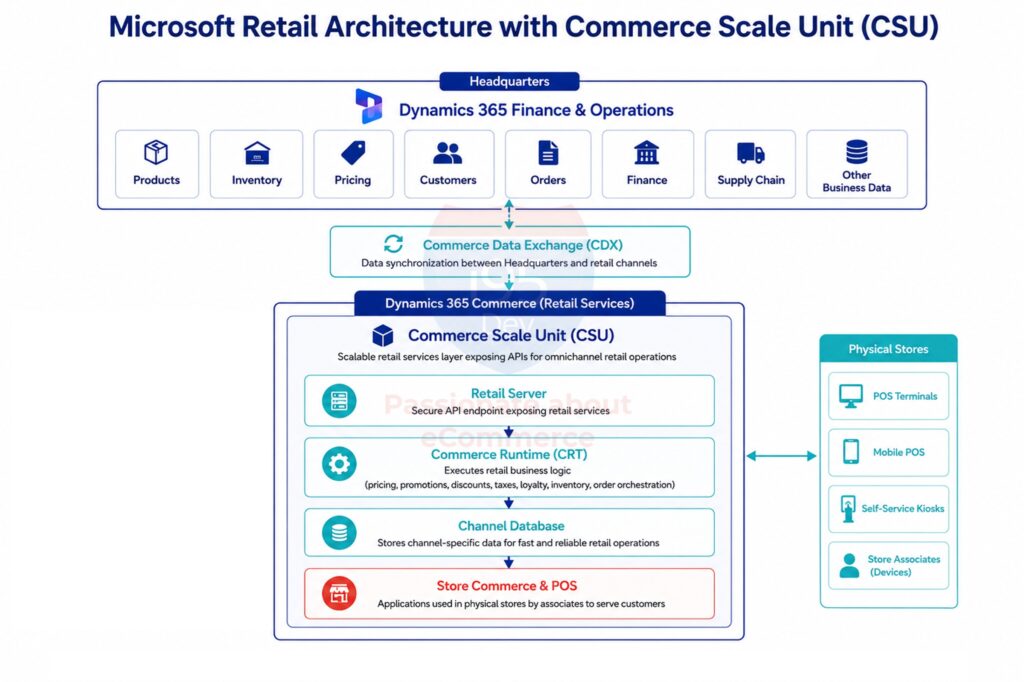
| Component | What It Does |
|---|---|
| Headquarters (Dynamics 365 Finance & Operations) | System of record for products, pricing, inventory, customers, and financials |
| Commerce Scale Unit (CSU) | Exposes retail APIs for omnichannel operations without querying the ERP directly |
| Commerce Runtime (CRT) | Executes retail business logic: pricing, discounts, promotions, tax, loyalty |
| Retail Server | Secure API gateway that routes requests to Commerce Runtime |
| Channel Database | Local, retail-optimized data store for fast transaction performance |
| Commerce Data Exchange (CDX) | Synchronizes data between Headquarters and retail channels |
| Store Commerce / POS | Front-line applications store associates use for sales, returns, and exchanges |
Headquarters: The System of Record
This is your Dynamics 365 Finance & Operations environment. It governs product information, pricing configuration, inventory, procurement, and financial processes. Nothing about CSU changes this role. Headquarters remains the authoritative source of business data.
Commerce Scale Unit: The Retail Services Layer
CSU provides scalable retail APIs so applications, including your eCommerce platform, don’t need to query Headquarters directly for every retail interaction. It’s designed for the volume and speed that customer-facing retail requires.
Technically, CSU isn’t a single service so much as a deployable bundle: it packages the Channel Database, the Commerce async client, Retail Server, and Commerce Runtime together as one unit. Any connected client, whether that’s a POS terminal, a kiosk, Microsoft’s own e-commerce storefront, or your Adobe Commerce or Shopify integration, talks to the same CSU and gets back results computed by the same shared business logic.
Commerce Runtime: Where the Logic Lives
When a request reaches CSU, Commerce Runtime is what actually processes it. Pricing calculations, discount validation, promotion rules, tax, and loyalty logic all run here, using the same rules applied at your physical POS terminals. This is why a price calculated through CSU matches the price a customer would get in-store: both are running through the same engine.
Retail Server: The Secure Entry Point
Retail Server is the API layer that authenticates and routes incoming requests to Commerce Runtime. External applications communicate with Retail Server rather than reaching into retail logic directly.
Channel Database: Built for Speed
Instead of hitting Headquarters for every request, Commerce Runtime pulls most of its operational data from the Channel Database – a retail-optimized store already synced with Headquarters data. That’s what keeps response times fast even under heavy traffic.
Commerce Data Exchange (CDX): Keeping Everything in Sync
CDX is the synchronization layer that moves customer, product, pricing, inventory, and transaction data between Headquarters and the Channel Database, keeping every retail channel aligned with the ERP.
Store Commerce and POS: The In-Store Experience
Store associates use Store Commerce or POS to process sales, returns, and exchanges. These applications depend on CSU, Retail Server, Commerce Runtime, and the Channel Database, the exact same components your eCommerce platform would call through an integration.
How CSU Is Deployed: Cloud, Self-Hosted, and CSU Core
CSU isn’t a one-size-fits-all deployment, which matters if you’re considering this for a specific store footprint.
For many retailers, Microsoft offers CSU as a cloud-hosted, Microsoft-managed service, which is a better and simpler option and the right default unless a specific store has a reason to need otherwise.
For locations with spotty connectivity, retailers can run a self-hosted CSU on-site. Because the Channel Database and Commerce Runtime are part of the deployable unit, a self-hosted instance can keep processing sales, pricing, and inventory locally even if the connection back to Headquarters drops, then resynchronize once connectivity returns.
That matters more than it sounds like: for a store that can’t afford to stop ringing up sales during an internet outage, it’s often the whole reason to go this route.
Microsoft has also been shifting CSU toward CSU Core, a next-generation runtime built on ASP.NET Core that delivers the same retail capabilities with better performance. If you’re considering a new implementation, it’s worth checking with your Microsoft partner which runtime version your environment will run on, since this affects deployment options and performance characteristics.
Where Your eCommerce Platform Fits
This is the part that resolves most of the confusion. Your architecture doesn’t change shape when CSU enters the picture. It simply gains a second integration path alongside your existing one:
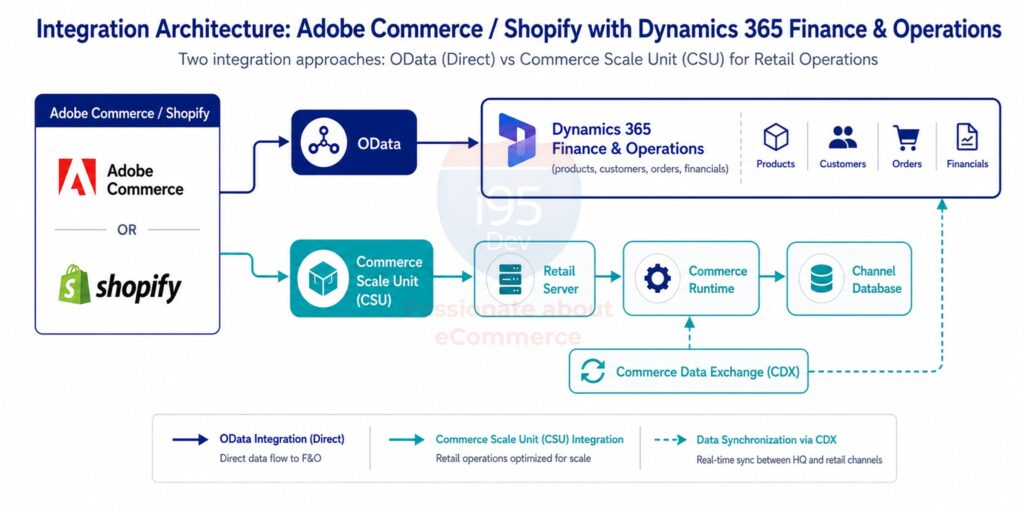
Your storefront continues to serve customers exactly as it does today. Finance & Operations continues to run your business. CSU simply gives the two a faster, purpose-built way to talk when the interaction is retail-specific rather than data-specific.
For understanding which integration path a given business process should use, read OData vs Commerce Scale Unit (CSU): Choosing the Right Integration Approach.
Do You Actually Need It?
Not every business does, and that’s worth saying plainly.
Finance & Operations APIs are typically enough when you need:
- Product and catalog synchronization
- Customer record synchronization
- Standard order synchronization
- Scheduled inventory updates
- Financial and operational reporting
Commerce Scale Unit becomes the better fit when you need:
- Real-time inventory by store, not just by warehouse
- Customer-specific or promotional pricing at checkout
- Buy Online, Pick Up In Store (BOPIS) or ship-from-store
- Loyalty programs that behave similarly online and in-store
- Integration with Microsoft POS or Store Commerce
If your business operates a single fulfillment location and sells through one channel, standard Finance & Operations integration may be all you need for now. If you’re running multiple stores, using Microsoft POS, or trying to make pricing and promotions consistent across channels, CSU is solving a problem that’s already showing up in your operations.
To understand these scenarios in practice, read 7 Retail Scenarios Where Commerce Scale Unit (CSU) Makes All the Difference.
The Practical Benefit: One Set of Rules, Every Channel
The value of CSU isn’t really about APIs themselves. It’s about consistency.
When pricing, promotions, and inventory checks all run through the same Commerce Runtime, whether the request comes from your Shopify storefront, a POS terminal, or a mobile app, customers get the same answer everywhere. That consistency is difficult to achieve any other way, because the alternative usually involves recreating Microsoft’s retail logic inside the eCommerce platform, then maintaining two versions of the same rules indefinitely.
CSU also tends to perform better for customer-facing interactions, since requests are served through Retail Server and the Channel Database rather than querying Headquarters directly for every pricing or inventory check.
Conclusion
It is easy to mistake the Commerce Scale Unit for another Microsoft product competing for your storefront. It isn’t. It’s the retail services layer sitting behind Dynamics 365 Finance & Operations, giving platforms like Adobe Commerce and Shopify a direct line to the same pricing, inventory, promotion, and POS logic running your physical stores.
For retailers with growing store networks, active POS operations, or real omnichannel ambitions, understanding this architecture is the first real step toward an integration built to keep up with the business — not just the one it started with.
Frequently Asked Questions
Continue Exploring the Commerce Scale Unit Series
This article is part of i95Dev’s content series on integrating Adobe Commerce and Shopify with Dynamics 365 Finance & Operations for omnichannel retail.
- Commerce Scale Unit (CSU): The Complete Guide
- Why Traditional eCommerce and Dynamics 365 Integrations Break Down in Omnichannel Retail
- OData vs Commerce Scale Unit (CSU): Choosing the Right Integration Approach
- 7 Retail Scenarios Where Commerce Scale Unit (CSU) Makes All the Difference
- 10 Common Mistakes When Integrating Adobe Commerce or Shopify with Dynamics 365 Finance & Operations

