
- Introduction
- Why Mid-Market Integration Is a Different Beast
- The Four Integration Approaches (And What Each One Really Costs)
- What Must Sync (And What Shouldn't)
- What Your ERP Vendor Won't Tell You About Integration
- Building the Business Case
- How to Evaluate an Integration Partner
- Frequently Asked Questions
Introduction
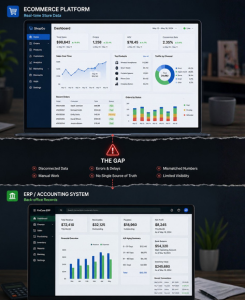
Mid-market businesses occupy an uncomfortable position in the ERP eCommerce integration market. The tools built for small businesses do not have the operational depth they need. The approaches designed for enterprise companies assume dedicated integration teams and IT budgets most mid-market organizations do not have. The result is a gap: a category of businesses with real integration complexity and no clear playbook for mid-market ERP eCommerce integration.
This guide is the ERP and eCommerce platform integration guide for mid-market businesses. It covers the four integration approaches on the market and what each one actually costs, how to assess whether your business is ready, which data needs to sync and which does not, what is different about each major ERP platform, how to build a business case that holds up in front of leadership, and what to ask when evaluating vendors.
It is written for IT directors, operations leaders, and eCommerce managers at mid-market companies running NetSuite, Microsoft Dynamics 365, or SAP Business One alongside Shopify, Magento, BigCommerce, or Adobe Commerce.
We built this guide because these questions come up in every conversation we have. We have tried to answer them the way we wish someone had answered them for us: directly, specifically, and without the sales pitch until the very end.

Why Mid-Market Integration Is a Different Beast
Mid-market ERP eCommerce integration is different because these companies run enterprise-level complexity on SMB-sized IT teams, so neither simple connectors nor heavy enterprise iPaaS tools truly fit. This structural mismatch makes ERP-eCommerce integration problems uniquely hard to solve with off-the-shelf products.
There must be an off-the-shelf fix for this. We cannot be the only company with this problem. — Said by nearly every mid‑market ops director we have ever spoken to.
They are right that they are not alone. They are wrong that the off-the-shelf fix exists. Here is why.
You’re not an SMB. You’re not an enterprise. The playbooks don’t fit.
Small businesses have simple operations. One warehouse. A few hundred SKUs. Orders that can be managed manually if the system goes down for a day. For them, a basic connector between their ERP system and eCommerce platform does the job. It is not elegant, but it works.
Enterprise companies have dedicated integration teams. They have IT departments with engineers who spend their careers managing middleware. They can afford the six-figure iPaaS contracts and the internal headcount to make them run.
Mid-market companies have neither. What they have is operational complexity that rivals the enterprise, and the IT resources of a company half their size. That is the gap. And it is structural, not accidental.
No time to read now?
Learn how mid-market businesses evaluate integration approaches, reduce operational complexity, and scale connected commerce.
If your business looks anything like the companies we work with, you are probably running:
- Between 500 and 50,000 SKUs: too many to manage manually, not always clean enough to sync automatically
- Multiple warehouses or fulfilment locations, with inventory that needs to be accurate across all of them in near real time
- More than one sales channel: a B2B operation, a D2C storefront, presence on Amazon or other marketplaces, and possibly multiple brand storefronts sitting on the same infrastructure
- A B2B channel with its own requirements: customer-specific pricing, credit terms, account hierarchies, and order workflows that look nothing like a standard D2C checkout
- A lean IT team, typically two to twenty people responsible for everything from infrastructure to support tickets to the integration
- An ERP that has been customized over time, because your business does not run on out-of-the-box defaults, and neither does anyone else’s after year two
That combination, real operational complexity, limited IT capacity, and an ERP shaped by years of custom configuration, is what makes mid-market integration genuinely hard. Not impossible. Just hard in a way that most vendors do not acknowledge, and most guides do not address.
The pressures are compounding
The difficulty is not static. Mid-market businesses are being squeezed from multiple directions simultaneously, and most of them connect back to the ERP-eCommerce gap.
Customers expect pure-play eCommerce standards. Real-time inventory on the product page. Accurate delivery estimates at checkout. Instant order confirmation. Shipment tracking the moment a label is printed. Amazon set these expectations. Your customers now hold every B2B and D2C experience to the same standard, regardless of how complex your back-office actually is.
D2C expansion is accelerating. Manufacturers and distributors that spent decades selling through channel partners are launching direct storefronts. That is a new eCommerce channel, a new fulfilment model, and a new customer data set, all of which need to connect to an ERP that was never designed with D2C in mind. The demand for ERP integrations for manufacturers and distributors has accelerated sharply as a result; and the ERP integration benefits for online stores running direct channels are now impossible to ignore.
Finance wants clean data. Every order that is manually re-entered is an order that can be entered wrong. Wrong price. Wrong quantity. Wrong customer account. The reconciliation problem that it creates in accounts receivable is not small, and it grows linearly with order volume.
Ops wants it automated. Ops wants it automated. The average mid-market operations team re-entering orders manually spends between 15 and 30 hours a week on data entry alone; and that’s before accounting for the overhead of managing warehouse integration with ERP separately.
That is before error resolution, before customer service calls caused by wrong information, and before the Friday afternoon where something breaks and nobody can figure out why.
These are not isolated IT problems. They are customer experience problems, finance problems, and operational efficiency problems wearing an IT costume.
Still managing orders, inventory, and customer data across disconnected systems?
See how i95Dev Connect helps unify ERP, eCommerce, marketplaces, and operations.
The patch that became the architecture
Most mid-market companies do not arrive at integration from zero. They arrive from something.
A basic connector set up three years ago. A CSV export that runs every night at 2am. A script someone’s developer wrote that mostly works. A manual export from the ERP every morning that the ops team imports into the storefront before the business day starts.
These patches share a common characteristic: they worked when the business was smaller.
At 200 orders a month and 800 SKUs, a nightly batch sync is manageable. At 2,000 orders a month and 8,000 SKUs, it is not. At 200 orders a month, one person running the manual export is a minor inefficiency. At 2,000 orders, that person is a full-time integration engineer, except they are called an operations coordinator and also handle six other things.
Without integration, growth is not limited by demand. It is limited by the number of orders someone can manually move between two systems.
“With selling on eBay and the Magento e-commerce store, customer, inventory and order management in Dynamics ERP has always been difficult for us, until we met i95Dev.”
Robert Blatt, COO, ProAudioStar
The inflection point is different for every business, but the shape of it is always the same. Everything works, then one thing breaks, then the patch for that creates a new fragility somewhere else, then a platform update breaks the patch, then it is a Thursday night and orders have stopped flowing and nobody knows why.
The patch does not fail dramatically. It fails slowly, then all at once.
Signs You’ve Outgrown Your Current Integration Approach
Your ops team has a recurring calendar block just to move data between systems. That time is not operations. It is maintenance of a gap that should not exist. You have oversold a product, apologised to a customer, and then had an internal conversation about whether to fix the root cause or just be more careful next time. You chose careful. Your integration works until something outside your control changes. A platform update, a new API version, a schema change. Then it is a scramble to find who can fix it and how long it will take. There is one person in your organisation who truly understands how the integration works. You have never said this out loud, but you know it. And you know what it would mean if they left. Your finance team reconciles eCommerce and ERP data manually at month end because the two systems never quite agree. The number changes depending on who ran the report and when. Your integration is not a growth enabler. It is a growth ceiling. New channels, new SKU launches, new markets: all of them are waiting on a system that was never built to scale.
Three or more: you need a new approach, not a better patch. Book a free integration readiness assessment to find out where you stand.
What’s actually on the table
Before you can make a good decision about integration, you need to understand what you are choosing between. Most companies go into this process thinking there are two options: build it or buy it. There are actually four approaches, and they are not equally suited to mid-market operations.
The next chapter covers all four: what they are, what they cost in full, who each one is actually right for, and where each one breaks.
No time to read now?
Get the complete PDF with integration frameworks, cost breakdowns, readiness checklists, and vendor evaluation guidance.
The Four Integration Approaches (And What Each One Really Costs)
If you search ‘ERP eCommerce integration’ right now, you will find four answers. They will all claim to be the right one.

Here is what each one actually means for a mid-market business, including what the sales deck will not tell you.
There are four approaches to mid-market ERP eCommerce integration: custom development, point-to-point connectors, iPaaS platforms, and managed integration. For most mid-market businesses, managed integration delivers the best balance of capability, cost, and operational ownership.
The ERP integration benefits for online stores are significant; eliminating manual order entry, enabling real-time inventory accuracy, and making B2B eCommerce ERP integration solutions viable at scale. Whether you are evaluating a standalone ecommerce ERP integration platform or a fully managed product, understanding which approach fits your operational reality is the core question this chapter answers. This chapter addresses the question “what are three approaches to ERP integration?” and goes further, covering a fourth that most mid-market businesses have not fully considered.
Every approach works. That is the honest starting point. The question is not whether an approach functions. The question is whether it keeps functioning as your order volume climbs, your SKU count expands, and your platforms push version updates you did not ask for. That is where the differences become consequential.
Approach 1: Custom Development
What it is: Your internal IT team or an external agency builds a bespoke middleware layer between your ERP and eCommerce platform.
The pitch your IT team makes: “We know our systems better than any vendor. We can build exactly what we need.” They are not wrong about knowing the systems. The problem is not the build. It is everything that comes after.
The reality of custom development:
Custom integration projects at mid-market scale routinely take six to eighteen months from scoping to go-live. Scope expands as edge cases surface. The agency adds change orders. Internal IT gets pulled onto other priorities. The original timeline doubles. You go live on a build that is already six months older than the platforms it connects.
Then maintenance begins. Every platform update is now your problem. Every new SKU attribute, every new payment method, every new fulfilment workflow: someone has to update the integration. If that someone is an external agency, you are paying time-and-materials rates indefinitely.
And then there is the question nobody asks at the start: who maintains it when the developer who built it leaves?
Custom builds create key-person dependency. The logic lives in their head as much as in the code. When they go, and eventually they go, you are left with underdocumented middleware that the rest of the team is afraid to touch.
When it is valid: Genuinely unique business logic that no available product can accommodate. Rare at mid-market scale, but real.
Verdict: Almost never the right call for mid-market eCommerce integration. The initial build cost is the smallest part of the total spend. The compounding maintenance cost is where it becomes expensive, and that cost is invisible until it is not.
Custom ERP integration cost is routinely underestimated because the build fee is only the beginning; ERP integration maintenance costs compound every time a platform updates, a developer leaves, or a new edge case surfaces that nobody scoped for. Custom ERP integration services make sense for genuinely unique logic; they rarely make sense as a long-term infrastructure strategy for lean mid-market IT teams. When weighing iPaaS vs custom integration pros and cons, the build cost is only one variable, ongoing maintenance ownership is where the real difference sits.
Pressed for time?
Download the complete ERP-eCommerce integration guide and read later.
Approach 2: Point-to-Point Connectors
What it is: A direct API connection built between two specific platforms, Shopify and NetSuite for example. Data moves between them along a fixed path, usually in one direction or via scheduled batch sync. Solutions like FarApp (now NetSuite Connector) and many native connector apps on the Shopify App Store are typical examples of this point-to-point approach. Teams evaluating Shopify ERP integration or Magento ERP integration options often encounter point-to-point connectors first. They are where most integrations start.
Who it seems right for: Companies at early eCommerce stages. Low order volume. Clean, simple product catalogue. Single warehouse. Straightforward pricing: one price, one currency, no customer-specific tiers.
Where it actually breaks:
The connector is built against a specific version of both platforms. The moment either platform pushes a major update, and Shopify, NetSuite, and Dynamics push them regularly, the connector can break. Sometimes silently. Sometimes you find out because orders stopped flowing overnight and nobody noticed until the morning.
There is also no middle layer. No error queue. If an order fails to sync, there is no automatic alert, no retry logic, no audit trail. Someone has to go looking for the problem, usually after a customer has already called.
Business logic is the other wall. Point-to-point connectors move data. They do not interpret it. Customer-specific pricing, multi-warehouse routing, B2B approval workflows, tax logic that varies by region: none of that is handled.
The hidden cost: Not the connector subscription. It is the IT hours spent firefighting every quarter when something breaks, every platform update cycle, every time a new edge case appears that the connector was never built to handle.
Verdict: The right tool for businesses under 500 orders per month, with a single warehouse, simple pricing, and IT bandwidth to maintain it. For most mid-market operations, point-to-point is where integration starts, not where it stays.
Approach 3: iPaaS as an eCommerce ERP Integration Platform
What it is: A generic eCommerce ERP integration platform like Boomi, MuleSoft, Celigo, and others provides the infrastructure to connect any two systems. You configure the integration on top of it. In the Boomi MuleSoft Celigo ERP eCommerce comparison, all three offer pre-built connectors for popular platforms. The differentiator is not what they can connect; it is who in your organisation is qualified and available to configure, test, and maintain those connections long-term. That is the iPaaS ERP integration mid-market reality that vendor pitch decks consistently understate.
The appeal: Flexibility. The no-code and low-code promise. Enterprise-grade architecture. The ability to connect your ERP to your eCommerce platform and, eventually, to your 3PL, your CRM, your EDI network, and everything else.
The part that gets undersold:
iPaaS gives you the platform. You still have to build the integration.
For popular platform combinations, most iPaaS vendors offer pre-built templates and connectors that handle basic functionality out of the box. That is a genuine head start. The question is what happens next.
Templates cover the standard flows: a basic order sync, a product push, a customer record. They do not cover your customer-specific pricing logic, your multi-warehouse routing rules, your B2B account hierarchy, or the three custom fields your ERP team added four years ago that everything downstream depends on. The moment your requirements move past the standard, you are configuring. And configuration requires someone who knows the platform well enough to do it correctly, test it thoroughly, and maintain it when something changes.
That someone is either on your team, or billed by the hour by an implementation partner. Either way, it is your problem to own indefinitely. This is the part that mid-market teams discover after signing the contract, not before.
Verdict: The right choice for organizations with dedicated integration engineers and genuinely complex, multi-system environments. The wrong choice for lean IT teams who need something running, not something to configure, manage, and maintain themselves. When evaluating iPaaS vs custom integration, the deciding factor is not capability—it is who owns the configuration, maintenance, and update cycle long-term.
“We looked at an iPaaS solution but ultimately ruled them out because the implementation timeline was very long and the costs were high. We looked at another competitor but decided not to go with them because they were very strict with their integration requirements and we felt they would have trouble with our modified D365 implementation. i95Dev’s connector was the best fit for our requirements: feature rich, flexible, secure, and with a great support team.”
Tony Kiefer, eCommerce Platform Manager, Fechheimer Brothers
Approach 4: Managed ERP-eCommerce Integration
What it is: A pre-built integration product designed specifically for ERP-eCommerce connectivity, with ongoing management, monitoring, and platform updates handled by the vendor, not your team.
How it differs from point-to-point: It is bidirectional. It handles business logic. It has error visibility: you can see what failed, why, and when. It is built to accommodate the operational complexity of a mid-market business, not just move data between two systems.
How it differs from iPaaS: You are not buying a platform and building on top of it. The integration itself is the product. Field mapping, sync logic, error handling, and platform update management are all included. When Shopify releases a new API version, the vendor updates the connector. Not your IT team.
In the managed integration vs custom development ERP debate, this distinction — vendor-owned updates versus team-owned maintenance; is where total cost of ownership diverges most sharply over a three-year horizon.
The honest trade-off: Configuration changes go through the vendor. Minor adjustments to field mapping or sync logic require a support request rather than a quick internal edit. Faster than rebuilding anything, but not as immediate as having direct access to the code yourself.
For the large majority of mid-market eCommerce operations, bidirectional product, inventory, order, and customer sync across standard platforms, it covers everything that needs covering.
Not sure which approach fits your stack?
The Deep Dive includes a decision framework + side-by-side TCO breakdown for all four. Free download.
i95Dev Connect sits in this category. Built specifically for NetSuite, Microsoft Dynamics 365, and SAP Business One paired with Shopify, Magento, BigCommerce ERP integration and Adobe Commerce ERP integration. Platform updates handled by our team, not yours.
Verdict: The right fit for mid-market operations scaling past 500 orders per month with a lean IT team, standard eCommerce workflows, and no appetite to own the integration as an internal infrastructure project.
The right fit for mid-market ERP eCommerce integration at scale: operations past 500 orders per month, lean IT teams, standard eCommerce workflows, and no appetite to own the integration as an internal infrastructure project.
The Side-by-Side
Use this to pressure-test whichever option your team is currently leaning toward.
| Point-to-Point | Custom Dev | iPaaS | Managed Integration | |
|---|---|---|---|---|
| Setup time | Days to weeks | 6 to 18 months | 3 to 6 months | Days to weeks |
| Who owns maintenance | Your IT team | Your IT team | Your IT team | The vendor |
| Platform update risk | High | High | Medium | Low |
| ERP-specific depth | Low | High (if built well) | Medium | High |
| Error visibility | Low | Depends on build | Medium to High | High |
| Scalability | Low | Medium | High | High |
| TCO at scale | Medium | Very high | High | Medium |
| Best fit | Under 500 orders/month | Unique bespoke logic only | Dedicated integration team | Lean IT, scaling mid-market ops |
One line worth sitting with before the next chapter: the question is never which approach costs the least today. It is which one you can still rely on in two years, when your order volume has doubled, one platform has pushed a major version update, and the person who set it up has changed roles.
Why We Built It This Way
One of the first decisions we made when building Connect was what we wouldn’t do: build a general-purpose integration platform. There are good ones already. Trying to cover everything sounds like a strength in a pitch deck and becomes a liability when something breaks at 2am.
Instead, we went deep on specific ERP and eCommerce combinations, concentrating engineering effort, QA cycles, and learning of implementation where it matters most. We’re expanding that portfolio deliberately, and the criteria is never just “can we technically connect these two systems.” It’s whether we understand the business logic deeply enough to own it with confidence.
If your stack is in our current portfolio, you’ll get something built specifically for your configuration. If it isn’t, it’s worth a conversation.Prasun Kumar Paul , Head of Product , i95Dev
What Must Sync (And What Shouldn’t)
You have chosen your approach. Now comes the question every implementation team eventually argues about: what actually needs to sync? The answer depends less on technology than on your business model. Get it wrong in either direction, and you are either managing data conflicts or fielding customer calls. Here is how to get it right.
The core question of what data needs to sync between ERP and eCommerce comes down to your business model. Non-negotiables include products, inventory, orders, order status, and customer records. Everything else is conditional or should be kept out of the integration entirely.
Both over-syncing and under-syncing are expensive. Over-syncing creates noise, data conflicts, and a maintenance burden that scales with every new object added to the integration. Under-syncing means the customer experience breaks down: inventory is not accurate, order status does not update, and customers contact support for information that should have been automatic.
The right answer is not a long list or a short one. It is the right list for your business model.
Need the quick version?
Download the guide and discover scalable integration strategies built for growing commerce operations.
How to Integrate ERP and eCommerce: The Non-Negotiables
These are the data entities that must sync for the integration to function. Missing any one of them creates a gap that breaks either the customer experience or the operational flow.
Product catalogue. Every SKU, variant, pricing tier, and product description needs to flow from ERP to eCommerce. The ERP is the master record for product data. What lives in the ERP is what gets published to the storefront.
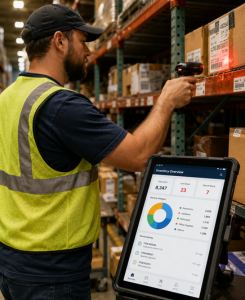
Inventory levels. Real-time data sync between ERP and eCommerce for inventory is not optional for any business running more than a few hundred orders per month. Inventory sync between ERP and eCommerce needs to be event-driven, not batch.. the moment a product sells out, the storefront needs to know. Batch nightly syncs fail the moment a product sells out at 10am and the storefront continues selling it until 2am when the next batch runs. Oversells destroy customer trust faster than almost any other failure mode in eCommerce.
Orders. Every order placed on the eCommerce platform must land in the ERP without manual re-entry. This is the core operational flow the integration exists to automate. The most fundamental answer to how to integrate ERP and eCommerce: eliminate every manual touchpoint between storefront and ERP.
“We can now process orders faster, reduce manual tasks, and have a solid foundation for growth. Huge thanks to i95Dev for integrating Microsoft Dynamics 365 for real-time data sync.”
Nicole Cartica, Consumer Services Director, Earthcore Industries
Order status and tracking. The sync is bidirectional. When the ERP generates a shipment and a tracking number, that information needs to flow back to the eCommerce platform and to the customer. Real-time order status is now a baseline customer expectation, not a premium feature.
Customer records. Particularly critical for B2B operations with customer-specific pricing, credit terms, or account hierarchies. Customer records need to sync to prevent duplicate accounts, ensure correct pricing is applied at checkout, and give customer service a single view of order history.
The Conditionals
These entities need to sync for some business models and not others. The mistake is defaulting to syncing them because they seem related, rather than confirming they are actually required.
Returns and RMAs. For D2C businesses, returns sync is essential. For B2B operations, return processes are often handled off-platform through account managers and credit notes, and syncing them adds complexity without customer-facing value. Decide before you build.
Promotions and discount logic. eCommerce platforms have mature native promotion engines. Unless your pricing logic is ERP-driven, such as customer-specific discount tiers or contract pricing for B2B accounts, promotions are often better managed entirely within the eCommerce layer.
B2B account data: credit limits, net terms, and account balances. For businesses running a B2B channel, these are not optional extras. Effective B2B eCommerce ERP integration means surfacing account-specific data at checkout. A B2B buyer who reaches checkout without visibility into their credit limit, available balance, or payment terms is a B2B buyer who calls their account manager instead of completing the order. Syncing this from ERP to eCommerce is what makes self-service B2B actually work. It requires ERP-side account hierarchies to be clean and consistently structured, but the operational payoff is significant: fewer calls to account managers, faster order cycles, and a checkout experience that matches how B2B buyers actually operate. It is the difference between B2B eCommerce ERP integration that enables self-service and one that simply moves order records.
Multi-currency and multi-warehouse routing. Growing mid-market businesses need this eventually. Warehouse integration with ERP adds meaningful complexity; location-level inventory sync between ERP and eCommerce requires the integration layer to understand routing rules, not just move stock counts. Build for it when required, but do not force the complexity into the initial scope if single-currency, single-warehouse operations are the current reality.
What Not to Sync
Internal financial data. Raw general ledger entries, cost of goods, internal purchase costs, and margin fields have no place in an eCommerce platform. These are back-office records with no customer-facing function and real compliance exposure if surfaced incorrectly.
Internal workflow fields. Approval statuses, internal notes, buyer codes, cost centre references: these are operational fields that exist for back-office use. They have no function in the eCommerce layer and add noise to every product and order record.
Sensitive operational data. Supplier pricing, contract negotiation history, and internal cost structures: if it would damage a customer or supplier relationship to have it visible, it does not belong in a system that faces customers.
ERP as Master vs. eCommerce as Master: Decide Before Day One
The most common cause of post-launch data conflicts is ambiguity about which system is the master record for which data entity. Product data: ERP is master. Always. Changes to product records happen in the ERP and sync to the storefront. Pricing: ERP is master. Always. eCommerce platform overrides should be narrow exceptions for promotional pricing, not the default pricing logic. Customer records: For B2B, ERP is master. For D2C, the eCommerce platform often captures the primary customer relationship. Orders: eCommerce platform is the origin. ERP is the system of record for fulfilment and finance. Orders flow one way: storefront to ERP. Getting this wrong creates a situation where two systems think they are both master for the same data. The result is conflicts, overwrites, and a support burden that scales with order volume.
The data entities above apply regardless of which ERP you are running. But how they sync, the API behaviour, the rate limits, the failure modes, varies significantly depending on your platform. That distinction matters more than most vendors will tell you.
Too busy to read now?
Save the guide — used by 450+ mid-market integrations to scope correctly from day one.
What Your ERP Vendor Won’t Tell You About Integration
Every integration vendor will tell you they support your ERP. What they mean by that varies enormously.
One of the most important ERP eCommerce integration best practices for mid-market ERP eCommerce integration is choosing a vendor who has gone deep on your specific ERP platform, not one who claims broad support across all of them. NetSuite, Dynamics 365, and SAP B1 have fundamentally different API models, rate limit behaviors, and failure modes.

When a vendor says they support NetSuite, Dynamics 365, and SAP B1, they are telling you very little. These are architecturally different platforms with different API models, different rate limit behaviours, different failure modes, and different edge cases that only surface under real operational load.
What your ERP vendor will not tell you is that the integration approach that works cleanly on one of these platforms can fail quietly on another. And what most integration vendors will not tell you is which category their connector actually falls into.
Here is what mid-market teams running each platform consistently get wrong, and what a well-built integration handles differently.
NetSuite
The governance points trap. NetSuite enforces API rate limits through a concurrency governance model. Each API call consumes governance points, and accounts have a fixed allocation per rolling window. Under normal order volumes this is not an issue. When volume spikes during peak trading periods or large catalogue syncs, an integration using batch polling can hit the ceiling fast. Calls start failing. Silently, unless error queue monitoring is in place. Most teams find out from finance, not from the integration.
Any evaluation of a NetSuite eCommerce integration solution should include a direct question: how does your connector handle NetSuite governance limits under peak load? This applies whether you are scoping a NetSuite Shopify integration, NetSuite Magento integration, or NetSuite BigCommerce integration, governance behaviour is consistent across all three.
Saved search brittleness. Many NetSuite integrations use saved searches as the trigger mechanism for data sync, querying NetSuite on a schedule for records that have changed. Schema changes, field renames, and filter logic updates can break a saved search without surfacing any obvious error. The integration keeps running. It is just not returning the right records anymore.
Licensing implications nobody flags upfront. Every API-connected touchpoint to NetSuite may carry licensing cost implications depending on your agreement. Worth confirming before scoping, particularly if you are planning multiple connected systems.
What the right integration does differently: Event-driven sync via the REST Record API with a managed error queue, not batch polling on saved searches. Governance-aware rate limiting that prevents ceiling breaches during peak periods without throttling normal operations.
i95Dev Connect uses a native NetSuite connector with pre-built field mapping, governance-aware rate limiting, and a real-time error queue with automatic retry and alerting. This covers the full range of NetSuite Shopify integration, NetSuite Magento integration, and NetSuite BigCommerce integration stacks.
Microsoft Dynamics 365 Business Central and F&O
BC and F&O are not the same product. Business Central and Finance & Operations share a brand but have separate codebases, separate API architectures, and separate implementation profiles. A connector built for BC does not work on F&O without significant rework. Any vendor who says they support Dynamics 365 without specifying which product has either not done both, or is not being precise about what their connector actually covers.
NAV migration debt compounds integration complexity. Many mid-market companies running Dynamics today migrated from an older NAV installation, carrying years of customisations into the new environment. Custom tables, modified standard fields, and non-standard workflow logic all create integration surface area that a generic connector will not account for.
Extensions break field mapping. Business Central’s extension model encourages ISV and custom development. Extensions that add or modify fields can silently break standard field mapping if the integration connector does not account for them. This needs to be validated at implementation, not assumed.
What the right integration does differently: Separate purpose-built connectors for BC and F&O, not a single generic Dynamics connector applied to both. NAV migration environments assessed at onboarding to identify customisation debt before it becomes a go-live problem.
i95Dev Connect maintains distinct connectors for Business Central and Finance & Operations. NAV migration environments are assessed at onboarding. Platform combinations covered include Business Central Shopify integration, Magento Dynamics 365 integration, and Dynamics 365 eCommerce integration across both BC and F&O.
SAP Business One (SAP B1)
Two API architectures. One ERP. Most vendors only support one. There are two ways to integrate with SAP B1, and which one applies depends entirely on your deployment model.
The DI API is the legacy interface: COM-based, Windows-dependent, and requiring a local connection to the B1 server. Most on-premise B1 deployments still run on DI API only. The Service Layer is the modern REST-based API available in cloud deployments and on-premise installations running version 9.2 or later.
An integration built for Service Layer will not work on a DI API-only environment. Many mid-market B1 users do not know which one their deployment is running until an implementation starts and someone checks. Most vendors configure for one and discover the other mid-project.
B1 requires more mapping work than most vendors scope for. SAP B1 was built for manufacturing and distribution, not eCommerce. Mapping B1 data to what an eCommerce platform expects, product descriptions formatted for a product detail page, tiered pricing rules, customer-specific price lists, requires more configuration work than a NetSuite or Dynamics implementation. Vendors who do not flag this upfront are either unaware or not being straight with you.
What the right integration does differently: Deployment model and B1 version confirmed before scoping begins, not discovered mid-project. Architecture designed for the actual deployment, not retrofitted after go-live.
i95Dev Connect handles both DI API and Service Layer deployments for SAP Business One eCommerce integration. This includes SAP Business One Shopify integration, and extends across Magento and BigCommerce for B1 deployments on both Service Layer and DI API. Deployment model is confirmed during onboarding and the integration is scoped accordingly.
The One Question to Ask Every Vendor
Which API does your connector use for our ERP, and why? A vendor with genuine depth will answer immediately and specifically: which API, which version, how they handle rate limits, what happens when your platform pushes a major update, and what they have seen break in environments like yours. A vendor without it will describe their product. Those are not the same answer.
You now know more about ERP-eCommerce integration than most people who will sit across from you in a vendor evaluation. The next question is not technical. It is financial. Here is how to translate what you have learned into a conversation that gets the decision made.
No Time to Read Now?
Pressed for time? Save it for later.
Building the Business Case
Building the business case for integration means proving that the cost of inaction is already visible in your own operations.
The hardest part of getting integration approved is not the technology. It is the conversation you are not prepared for. This chapter prepares that conversation.
Integration decisions sit at the intersection of IT, operations, and finance. The people who feel the pain most acutely are rarely the people who sign off on the spend. To move from problem to approval, you need two things: a number the CFO can verify and a risk narrative that makes inaction feel more expensive than action.
Both are buildable from data you already have.

Know Your Audience Before the Meeting
Integration is not one stakeholder’s problem. It rarely gets approved by one person either. Before walking in, map the room.
| Stakeholder | What They Care About |
|---|---|
| CFO / Finance | Total Cost of Ownership, error rate cost, reconciliation overhead |
| COO / VP Ops | Manual hours, fulfilment accuracy, headcount efficiency |
| IT Director | Maintenance burden, platform update risk, key-person dependency |
| eCommerce Manager | Inventory accuracy, customer experience, oversell incidents |
| Sales Leadership | Order turnaround time, B2B self-service capability, new channel revenue |
Tailor the conversation to the room. The CFO needs a number. The COO needs a process argument. The IT Director needs a maintenance story. Start with the one who feels the pain most acutely and build out from there.
The Two Levers
Every integration business case rests on the same two arguments.
Cost avoidance is what the broken or absent integration is costing you right now, in ops hours, error resolution, and customer churn. This number already exists in your business. You are just not looking at it as a line item.
Revenue enablement is what integration makes possible that is not possible today: faster product launches, new sales channels, higher conversion rates from accurate inventory. Lead with cost avoidance. It is harder to argue with than projected upside.
Quantifying Cost Avoidance
Manual order entry cost: Hours per week spent manually entering or reconciling orders, multiplied by the fully-loaded hourly cost of the staff doing it, multiplied by 52. Most mid-market operations teams spend between 15 and 30 hours per week on this. At a conservative $35 per hour loaded rate, that is $27,300 to $54,600 per year in ops headcount cost alone, before errors. When leadership asks how much does an ERP integration cost, this number is the right place to start the answer: what is the cost of not integrating?
Error rate cost: Take the percentage of orders that contain errors from manual handling, typically between 2% and 8% in non-automated environments. Multiply by average order value, then by annual order volume. A business processing 10,000 orders per year at $500 average order value with a 4% error rate is managing $200,000 in potentially affected order value annually.
Fulfilment delay impact: Customers who experience a fulfilment failure churn at significantly higher rates. If you know your average customer lifetime value and can estimate the percentage of orders affected by delays caused by data sync gaps, the retention cost becomes visible.
“The implementation has significantly reduced manual efforts, improved data accuracy, and enhanced order processing efficiency. The real-time sync capabilities have enabled our teams to make informed decisions and deliver a smoother customer experience.”
Mohammed AL Sabbagh, IT Manager, Saudi Ice Cream Factory
Quantifying Revenue Enablement
Faster product launches. How many new SKUs are delayed each quarter because product data has to be manually uploaded after ERP entry? At what average revenue per SKU per month?
Multi-channel expansion. Integration is the operational prerequisite for managing multiple sales channels from a single back-office system: a B2B portal, a D2C storefront, a marketplace presence. Without it, each new channel multiplies manual effort. What is the revenue potential of the next channel your team has been holding back?
B2B self-service revenue. For businesses serving business customers, integration with the right account data, credit limits, and net terms unlocks a self-service B2B ordering channel. Orders that currently go through account managers can move to a portal. That frees your sales team for higher-value activity and expands reachable order volume without adding headcount.
Inventory accuracy and conversion rate. Overselling events damage conversion rates beyond the immediate cancelled order. Real-time inventory sync reduces these incidents. The conversion rate recovery is real.
The Risk Frame
Three risks are worth naming explicitly for a leadership audience.
Operational risk. What happens if the person who currently manages the manual sync process leaves? How long does it take to retrain someone? What breaks in the interim? For most mid-market businesses, the honest answer is: more than leadership realises.
Platform risk. Your ERP and eCommerce platform will release major version updates. If your current integration is not managed by a vendor who tracks those updates, the update is your problem to solve. That cost arrives without warning and cannot be deferred.
Competitive risk. Your customers’ expectations are shaped by the best eCommerce experience they have encountered, not the average one. Real-time inventory, self-service order tracking, accurate delivery estimates, and streamlined returns are now baseline expectations in both B2C and B2B buying. Every month without them is market share you are making easier for a competitor to take.
The TCO Comparison That Changes the Conversation
The most common mistake in integration business cases is comparing the cost of a managed integration product against zero. Understanding the true ERP integration total cost of ownership for your ERP eCommerce integration means comparing against the full cost of the alternative.
Custom development: scoping, build, testing, and go-live, plus ongoing maintenance, platform update management, and the opportunity cost of IT capacity consumed indefinitely. Point-to-point: subscription cost plus IT hours on every platform update cycle and every error that requires manual resolution. Doing nothing: the cost avoidance number above, compounding annually.
When the comparison is structured correctly, the managed integration product is rarely the most expensive option. It is usually the least expensive by end of the first year.
One-Page Business Case Structure
1. Current state cost: Ops hours plus error rate cost plus fulfilment delay impact, annual
2. Revenue at risk: Conservative estimate of growth blocked by manual process, annual
3. Integration investment: Product cost plus implementation, one-time and recurring
4. Projected ROI at 12 months: Cost avoidance recovered plus revenue enabled, net of investment
5. Risk of inaction: Operational, platform, and competitive risk, stated plainly
Want to run these numbers against your own data? i95Dev’s ROI calculator does the calculation based on your eCommerce ERP integration platform, stack, and order volume; and outputs a one-page summary you can take into the leadership meeting.
Need these numbers fast?
Enter your specifics and our calculator returns with a number.
The business case gets you the budget. The partner evaluation gets you the outcome. These are different decisions and most organizations conflate them. Here is what to look for once the spend is approved. Not sure if your business is ready to integrate? Book a free integration readiness assessment and get a clear picture before you commit.
How to Read This Market
The integration market has a terminology problem. “Purpose-built.” “Native connector.” “Fully managed.” These phrases mean different things to different vendors and are rarely defined in the same conversation where they’re used.
Here’s the honest segmentation: iPaaS platforms give you flexibility but put ownership on your team. Custom builds give you exactly what you need and full maintenance responsibility. Managed ERP eCommerce integration means a product like Connect that comes pre-built for specific stacks; platform updates and monitoring are on us, not you.
None of these is the right answer in every situation. The right answer depends on your team, your stack, and how much integration complexity you want to own long-term. Chapter 6 gives you eight questions to ask any vendor you’re evaluating – including us.
How to Evaluate an Integration Partner
Most integration vendors can technically build the connection. The difference is whether they can own failures, fix issues quickly, and support the exact ERP and eCommerce stack that mid-market ERP eCommerce integration actually runs on.

Integrations fail on accountability, specificity, and support, so those are the criteria that matter most when choosing a partner.
When deciding how to choose an ERP eCommerce integration partner, the key criteria are platform-specific depth, proactive error monitoring, named support contacts, and verifiable references on your exact ERP and eCommerce stack.
Eight Questions to Ask Every Vendor
These are the questions to ask every ERP integration vendor before you commit. They are designed to expose the gaps that vendor presentations typically obscure.
1. Is this built specifically for my ERP and eCommerce combination, or configured on a generic integration platform?
A purpose-built connector for NetSuite and Shopify is architecturally different from a Boomi or MuleSoft configuration that connects the two. The former is maintained by people who know both platforms deeply. The latter is maintained by whoever configured it, using your IT team’s time and budget.
2. Who handles platform updates when Shopify or NetSuite releases a major version: your team, or ours?
This answer tells you who owns the ongoing risk. If the answer is your team, you are buying a product plus a maintenance obligation. If the answer is the vendor, you are buying a managed service. Both are valid arrangements. Know which one you are agreeing to.
3. What does error visibility look like? Can we see what failed, why, and when, in real time?
Errors will happen. The question is whether you find out proactively or reactively. A vendor with genuine error visibility will describe their alerting model specifically: what triggers an alert, who receives it, what the retry behaviour is, and what the escalation path looks like.
4. What is your average go-live timeline for our specific ERP and eCommerce stack?
Not the fastest go-live they have ever achieved. The average for your exact combination, with the level of customisation your environment has. If they cannot give you a number grounded in comparable implementations, they are estimating, not quoting.
5. How do you handle custom business logic: customer-specific pricing, multi-warehouse routing, B2B approval workflows?
Standard product data and order sync are solved problems. The question is whether the vendor has built the flexibility to handle your specific operational requirements without a full custom development engagement. Ask for an example from a comparable implementation.
6. What does ongoing support look like after go-live: a named contact, or a ticket queue?
When something goes wrong at high order volume, the resolution timeline matters enormously. Named contacts with direct access to the integration’s configuration are worth more than SLA language in a contract.
7. Can you provide a reference customer on our exact ERP and eCommerce stack, willing to speak with us?
Not a general reference. A reference on your specific combination. A vendor with genuine depth in your stack will have them.
8. What happens to our integration if we upgrade ERP versions or migrate eCommerce platforms in the next three years?
You will change platforms at some point. The question is whether your integration survives it, and who pays for the transition. A vendor who cannot answer this question concretely has not thought about your long-term.
What to Watch For
Red flags:
- Vague SLAs with aspirational language and no committed response times
- “Fully customisable” as the answer to every question about business logic
- No references on your specific stack
- An inability to answer question eight with anything concrete
Green flags:
- Proactive error monitoring with defined alerting thresholds
- Documented field mapping specific to your ERP version
- Named support contacts post-go-live
- Reference customers on your exact stack who speak plainly about what went well and what did not
Ready to move beyond patchwork integrations?
The Frame That Changes How You Evaluate
You are not buying software. You are buying a long-term operational dependency that sits between your ERP and your storefront and processes every order your business takes.
Evaluate your ERP eCommerce integration with the same rigour you would apply to choosing a fulfilment partner, a payments provider, or an ERP itself. The annual cost of getting this wrong is likely higher than the cost of the integration product.
Ready to Build the Right Integration for Your Business?
You’ve read the guide. You know what good integration looks like. Let’s show you exactly what it looks like for your stack.