


Once a retailer understands what Commerce Scale Unit (CSU) does, one question follows almost immediately: should this integration use OData, or should it go through CSU?
It’s a fair question, and it’s also the wrong frame. OData and Commerce Scale Unit aren’t competing options. They’re built for different jobs, and most mature Dynamics 365 integrations end up using both, just for different parts of the architecture.
This article walks through where each one fits, where OData starts to strain, and how to decide which approach a given business capability actually needs.
Related reading: What Is Commerce Scale Unit (CSU) and Why Do eCommerce Businesses Need It?
Two integration surfaces, two different jobs
OData is Microsoft’s standard API framework for exposing Dynamics 365 Finance & Operations business entities. It’s the mechanism most retailers use to synchronize products, customers, sales orders, and financial data with an external eCommerce platform. It’s reliable, well documented, and does exactly what it’s designed to do: move ERP records in and out of Finance & Operations.
Commerce Scale Unit doesn’t expose ERP entities. It exposes retail business logic: the pricing calculations, promotion rules, inventory availability, and loyalty processing that run inside Microsoft’s retail engine. When your storefront needs an answer that depends on live retail rules rather than a stored record, CSU is the layer built to provide it.
The distinction is simple in practice: OData answers “what is this record?” CSU answers “what should happen right now?”
Where OData does its best work
For a large share of retailers, especially those early in their omnichannel journey, OData handles the integration end to end. Common use cases include:
- Publishing product catalogs from Finance & Operations to the storefront
- Synchronizing customer accounts
- Transferring completed online orders into the ERP
- Sharing standard inventory quantities
- Exchanging financial and fulfilment data for reporting
If your business sells primarily through one channel, fulfills from a central warehouse, and doesn’t need pricing or promotions to flex in real time, OData alone can carry an integration for years without becoming a bottleneck. There’s no need to introduce additional architecture before the business actually needs it.
Where does DMF fit into this?
Most conversations about Dynamics 365 integration jump straight to OData vs. CSU, but there’s a third tool worth naming: the Data Management Framework (DMF). It’s easy to conflate with OData, since both move data in and out of Finance & Operations, but they’re built for different volumes and different timing.
DMF is designed for large, structured batch work: bulk product imports, full catalog exports, initial data loads, or nightly bulk price updates. It includes staging, error handling, and scheduling that OData doesn’t offer, which makes it the better choice whenever you’re moving a large volume of records at once rather than reacting to a single event. What DMF isn’t built for is real-time interaction — Microsoft’s own guidance is explicit that DMF shouldn’t be used where a user interface needs an immediate response.
A simple way to keep the three straight:
| Tool | Best For | Not Built For |
|---|---|---|
| DMF | Large batch imports/exports, initial data loads, scheduled bulk updates | Real-time, request-by-request interaction |
| OData | CRUD on individual records, near-real-time sync of products, customers, orders | High-volume batch transfer; real-time retail logic |
| Commerce Scale Unit | Real-time retail logic: pricing, promotions, inventory, loyalty, POS | Bulk data movement; ERP master data ownership |
None of the three replace each other. A mature integration typically uses DMF for the initial catalog load and periodic bulk updates, OData for ongoing record-level sync, and CSU for anything that has to be computed live.
Where OData starts to show its limits
The strain usually shows up in five specific areas, all of which involve business logic rather than static data. It’s also worth being specific about OData’s own technical ceiling: it carries a transfer cap of roughly 10,000 records per page and is subject to API throttling — limits that rarely matter for record-level sync but become real constraints if a team tries to stretch OData into high-volume or real-time roles it wasn’t built for.
Store-level inventory
OData can sync a stock quantity. It can’t tell a shopper whether that quantity is actually available for pickup at a specific store once reservations, in-progress transactions, and safety stock are factored in. That calculation requires a retail service, not a data field.
Omnichannel pricing and promotions
Retailers with customer-specific pricing, tiered discounts, or store-level promotions often end up recreating those rules inside the eCommerce platform because OData wasn’t designed to evaluate pricing logic on demand. Every rule change then has to be implemented twice.
Loyalty and gift cards
Customers expect rewards earned in-store to be usable online, and vice versa, in real time. Synchronizing loyalty balances on a schedule almost always creates a lag that customers notice.
BOPIS and store-based fulfillment
Buy Online, Pick Up In Store depends on live inventory validation, reservation, and store notification working together. Batch-based order synchronization can’t support that without significant custom development.
Channel consistency
Customers don’t experience “online” and “in-store” as separate systems. They expect pricing, inventory, and promotions to match regardless of channel, which requires both channels to draw from the same rules engine rather than two loosely synced copies of it.
Related reading: Why Traditional eCommerce and Dynamics 365 Integrations Break Down in Omnichannel Retail
Comparing the two approaches
| Business Requirement | OData | Commerce Scale Unit |
|---|---|---|
| Product catalog synchronization | Well suited | Supported |
| Customer synchronization | Well suited | Supported where retail context is needed |
| Standard order synchronization | Well suited | Supported |
| Financial data exchange | Primary use case | Not the intended purpose |
| Store-specific inventory availability | Limited | Purpose-built for this |
| Customer-specific / omnichannel pricing | Limited | Native retail pricing engine |
| Promotions | Limited | Native promotion support |
| Loyalty programs | No general OData surface | Native capability |
| BOPIS / ship-from-store | Requires heavy customization | Purpose-built for this |
| POS integration | Not designed for this | Native retail integration |
The table makes the pattern clear. OData is strong wherever the requirement is exchanging ERP records. CSU is strong wherever the requirement is executing retail logic in real time.
How integration needs typically evolve
Most retailers don’t need CSU on day one, and that’s fine. The right architecture depends on where the business actually is, not where it might be someday.
Stage 1: Growing eCommerce business. Primarily online, one or two physical locations at most. Standard pricing, centralized fulfillment. An OData-based integration is usually sufficient, and adding CSU here would likely be more architecture than the business needs.
Stage 2: Expanding retail operations. Multiple stores, growing demand for BOPIS, and customers who expect consistent pricing across channels. This is typically where relying entirely on OData starts generating custom workarounds, and where introducing CSU for specific retail scenarios starts paying off.
Stage 3: Mature omnichannel retail. Multiple stores, warehouses, and fulfillment paths operating as one connected business. Unified inventory, real-time pricing, loyalty, and POS integration are core requirements. CSU becomes a central part of the architecture, while OData continues handling ERP data exchange in the background.
A practical order for adding CSU
Retailers moving into Stage 2 or 3 rarely need to implement every CSU scenario at once. Based on how these projects typically play out, a sensible rollout order is:
- Inventory availability – the highest-value, cleanest fit, and usually the first thing customers notice is wrong.
- Real-time pricing – especially for B2B customers on negotiated pricing or businesses running frequent promotions.
- Order capture – once the first two are stable and the team is comfortable with how CSU-based orders flow back to Finance & Operations.
- Loyalty – typically last, since it depends on customer identity and order history already being consistent across channels.
Everything else — product data, customer master records, financial transactions — stays on OData or DMF throughout.
Do you need to replace your existing OData integration?
No. That’s one of the most common misconceptions here. Adding Commerce Scale Unit doesn’t mean ripping out an OData integration that’s already working.
The practical approach most retailers take is to let each technology keep doing the job it’s good at:
| Business Function | Recommended Approach |
| Product and item synchronization | OData |
| Customer master data | OData |
| Financial transactions | OData |
| Standard order synchronization | OData |
| Store inventory availability | Commerce Scale Unit |
| Retail pricing and promotions | Commerce Scale Unit |
| Loyalty and gift cards | Commerce Scale Unit |
| BOPIS and POS interactions | Commerce Scale Unit |
This hybrid model minimizes disruption. Existing OData flows keep running, and CSU gets introduced only where it solves a real problem, not as a wholesale replacement.
It’s also worth being explicit about what should never move to CSU, no matter how far the omnichannel roadmap goes. CSU doesn’t expose these, and rebuilding them there would add cost with no functional gain:
- Product and category master data
- Customer master records and B2B company/contact hierarchies
- Customer groups and payment terms
- Warehouses and exchange rates
- Posted invoices, credit memos, and payment journals
- Custom ERP entities and extensions built for your business
These stay on OData or DMF permanently. In a typical Finance & Operations to eCommerce connector covering roughly two dozen functional modules, only a handful — generally inventory, pricing, order capture, and loyalty — are genuine CSU candidates. The rest are exactly where they should already be.
A practical reference architecture
For retailers evaluating this for the first time, a hybrid architecture typically looks like this:
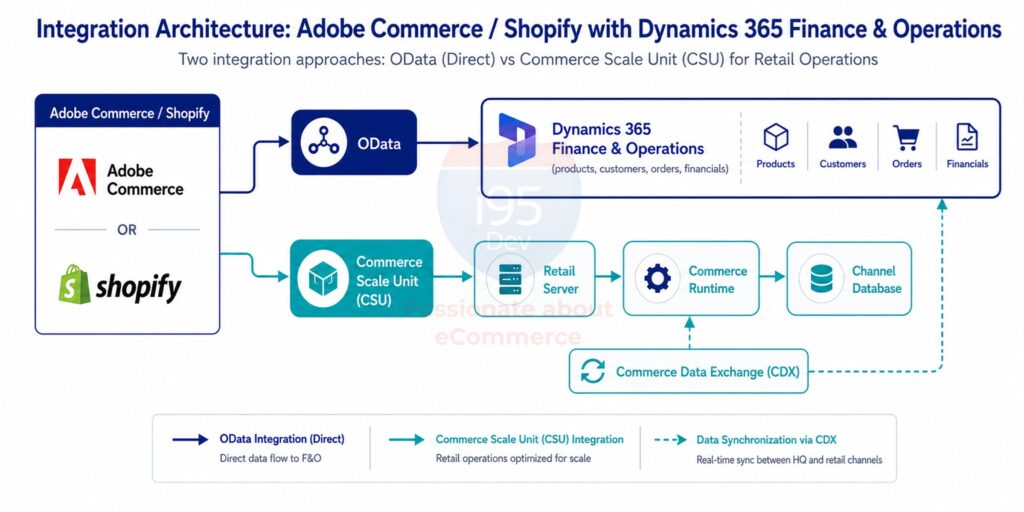
The integration layer determines which requests route through OData and which route through CSU, based on the business capability being served rather than a single blanket integration method.
Conclusion
OData and Commerce Scale Unit aren’t rivals — the right one depends on the business capability you’re trying to deliver.
If the requirement is exchanging ERP data, OData remains the right and simplest choice. If the requirement is delivering a retail experience — real-time inventory, consistent pricing, loyalty, BOPIS — that behaves the same whether a customer is online or in a store, CSU is built for that job.
Most retailers eventually need both. Building the architecture with that in mind from the start avoids a costly redesign later.
Frequently Asked Questions
Continue exploring the Commerce Scale Unit series
This article is part of i95Dev’s content series on integrating Adobe Commerce and Shopify with Dynamics 365 Finance & Operations for omnichannel retail.
- Commerce Scale Unit (CSU): The Complete Guide
- Why Traditional eCommerce and Dynamics 365 Integrations Break Down in Omnichannel Retail
- What Is Commerce Scale Unit (CSU) and Why Do eCommerce Businesses Need It?
- 7 Retail Scenarios Where Commerce Scale Unit (CSU) Makes All the Difference
- 10 Common Mistakes When Integrating Adobe Commerce or Shopify with Dynamics 365 Finance & Operations

