


Understanding what Commerce Scale Unit (CSU) is only answers half the question. The more useful question for most solution architects and IT leaders is: what does it actually solve, in practice, for a retailer running Adobe Commerce or Shopify alongside Dynamics 365 Finance & Operations?
Here are seven scenarios where that shows up — in conversion rates, in support ticket volume, in whether a customer trusts what the website tells them.
If you’re still learning the basics, start with What Is Commerce Scale Unit (CSU) and Why Do eCommerce Businesses Need It? before diving into these examples.
1. Real-time inventory across online and physical stores
Inventory accuracy affects nearly every part of the customer journey, and it’s one of the first things omnichannel retailers get wrong.
When a storefront depends solely on periodic ERP synchronization, inventory data is often minutes or hours out of date by the time a customer sees it. That gap creates two common problems: customers order items that are no longer available, or retailers deliberately understock online to avoid overselling, hiding inventory that’s actually sitting in a nearby store.
CSU lets the storefront query real retail inventory at the moment a customer is browsing or checking out, factoring in reservations and store-level availability rather than a single warehouse total.
Business impact:
The payoff is fewer cancelled orders, better conversion on product pages, and inventory that’s already in stores actually getting used instead of sitting there.
2. Customer-specific pricing across every channel
B2B distributors, wholesalers, and businesses with loyalty tiers rarely charge every customer the same price. Those rules typically live in Dynamics 365 Finance & Operations as trade agreements, price groups, or negotiated contracts.
Without CSU, retailers often export pricing on a schedule or recreate the logic inside the eCommerce platform. Both approaches work until a price changes — then two systems need updating in sync, and something inevitably slips through.
CSU lets the storefront request the correct price for a specific customer at the moment of purchase, using the same pricing engine that governs POS and in-store sales.
Business impact:
That means fewer pricing disputes, less manual cleanup for sales and support, and one pricing engine instead of two that have to be kept in sync by hand.
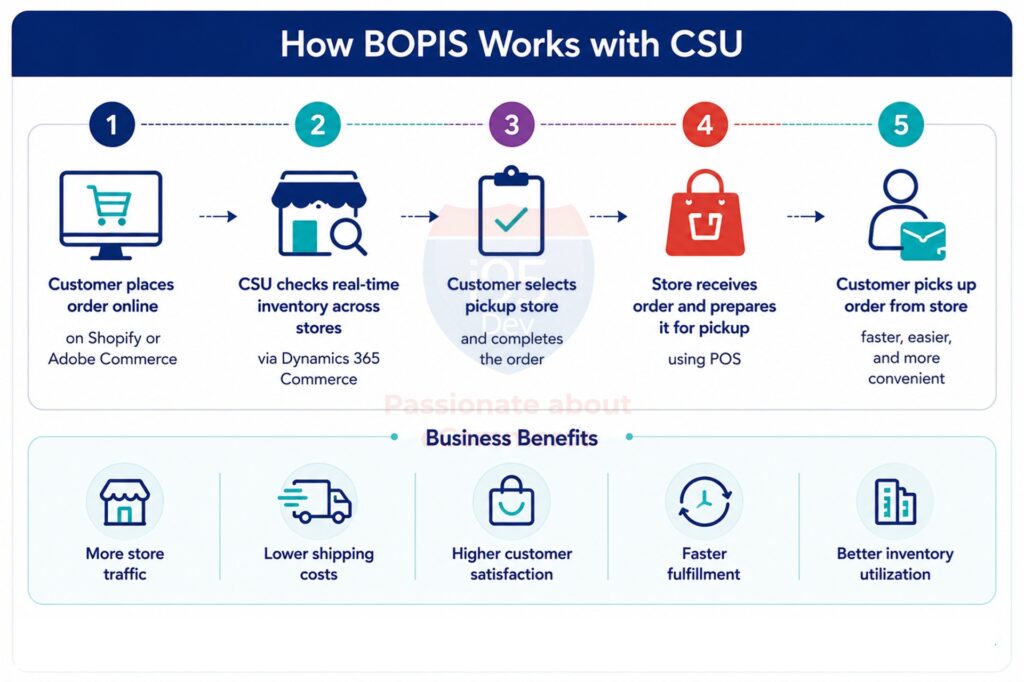
3. Buy online, pick up in store (BOPIS)
BOPIS sounds simple from a customer’s perspective: reserve online, collect in person. Delivering it reliably means several things have to happen correctly in sequence — confirming store-level availability, reserving the item, notifying the store, and making sure that same item doesn’t get sold to someone else in the meantime.
Batch-based integrations struggle here because inventory can change between the last sync and the moment a customer tries to check out. The result: cancelled pickups and a frustrated customer standing at a counter.
CSU gives the storefront access to live store inventory and reservation services, so a pickup order reflects what’s actually available at that specific location right now.
Business impact: Retailers running this well see fewer cancelled pickups, additional foot traffic, plus a real bump in revenue since customers picking up an order tend to buy something else too while they’re already in the store.
Related reading: OData vs Commerce Scale Unit (CSU): Choosing the Right Integration Approach
4. A loyalty program that’s actually one program
Disconnected loyalty programs are a common source of frustration. Points earned in-store don’t show up online for hours. Rewards redeemed on the website aren’t recognized at the register. Customer service can’t see a complete history because it’s split across two systems.
CSU exposes the same loyalty services used by Microsoft POS to the eCommerce platform, so points, balances, and redemptions stay consistent no matter where a purchase happens.
Business impact: Customers who trust the program tend to use it more — and having one reliable view of engagement across channels makes it much easier to tell whether a loyalty campaign is actually working.
5. Promotions that behave the same way everywhere
Few things damage customer trust faster than a promotion that behaves inconsistently. A “buy two, get one free” deal that works in-store but not online, or a coupon code that fails at checkout despite being advertised in an email, generates support tickets and abandoned carts.
Usually this happens because promotions get configured separately for the storefront and for POS, run through two rule sets that were never guaranteed to match in the first place.
CSU lets the storefront pull from the same promotion engine used in stores, so a campaign only needs to be set up once.
Benefits of unified promotions:
- One configuration point for marketing and merchandising teams
- Fewer pricing and promotion disputes at checkout
- Faster campaign launches, since there’s no second system to update
- Higher customer confidence in advertised offers
6. Omnichannel order management, not just order syncing
Customers rarely finish an entire purchase in one channel. They might find a product online, buy it through the storefront, pick it up in a store, and return it somewhere else entirely. To the customer, that should feel like one continuous relationship with the brand, not three separate transactions.
Most integrations are built to sync completed orders after the fact, not to support that kind of movement between channels while it’s happening.
CSU supports the mechanics behind these journeys: buy online and return in store, ship from the nearest location instead of a central warehouse, or fulfill a single order across multiple locations when no single store has full stock.
| Challenge Without CSU | Outcome With CSU |
|---|---|
| Slow fulfillment from a single warehouse | Faster fulfillment using the nearest available store |
| Store inventory sitting idle | Better utilization of inventory already in stores |
| Complicated cross-channel returns | Simpler, consistent returns and exchanges |
| High shipping costs | More flexible, cost-effective fulfillment options |
7. Store inventory visibility before a customer ever shows up
One of the most common reasons a shopper abandons a purchase is simple uncertainty: they’ve found the product but have no way to confirm it’s in stock nearby. Without that confidence, they call the store, drive over on a guess, or just buy from a competitor whose website is more honest about what’s actually on the shelf.
CSU lets the storefront move past a generic “in stock” label and show something a customer can act on such as availability at their preferred location or same-day pickup eligibility.
Business impact:
The result is more conversion on product pages, more online research turning into store visits, and fewer carts abandoned caused by uncertainty.
Two real omnichannel implementations
These scenarios aren’t hypothetical. Here’s how two of them actually played out.
A multi-banner retailer unifying loyalty across regulated product lines. A North American retailer operating several store banners across two regulated product categories ran each banner on its own Shopify storefront, while loyalty already lived on Dynamics 365 Commerce rather than a Shopify app. The goal was one customer identity and one loyalty wallet across every banner, live inventory for click-and-collect, and order capture that respected different rules per banner and per province — including products that could never be redeemed with points, a province where the loyalty program wasn’t permitted at all, and online orders that had to be reserved and paid for at pickup rather than settled online.
A standard OData sync couldn’t deliver this. Loyalty had no general OData surface to sync against, availability needed to be live, and order capture needed to apply the correct rules per channel automatically. The fix was adding CSU alongside the existing OData connector, not replacing it, with three real-time flows built against it: orders, customers (matched and deduplicated across banners), and loyalty (balance, tier, and expiring points read from CSU and displayed on the storefront, with earn activity posted back). Because loyalty and order logic ran through the same commerce engine behind POS and web, the regulatory rules could be enforced once, centrally, instead of getting recoded separately inside each storefront and slowly drifting apart from each other. Everything else — master data, catalog, finance — stayed exactly where it was, on OData.
A beverage manufacturer-distributor unifying web, call center, and store. A beverage manufacturer and distributor selling through web, mobile apps, and a call center, in a market with strict alcohol-retail regulation, was dealing with the usual symptoms of a stretched-thin integration: delayed stock updates, promotions that didn’t match between channels, compliance gaps, and constant manual reconciliation. The call center alone accounted for roughly 30% of sales, so any price or stock mismatch was felt immediately by a live agent on the phone.
The target was stock-update latency of ten seconds or less across every channel — a number that rules out batch polling on its own. The resulting architecture kept Dynamics 365 Finance & Operations as the authoritative source for inventory, financials, and tax, while the storefront, call-center app, and mobile apps handled catalog, cart, and checkout, connected to near-real-time inventory and a single order lifecycle (creation, cancellation, modification, returns) spanning web, mobile, call center, POS, and ERP under one consistent order identifier. Store Commerce POS participated directly for in-store fulfillment, including click-and-collect with QR pickup confirmation. Regulatory requirements like age verification, bottle-deposit handling, and region-specific pricing had to behave identically everywhere — which was only possible because every channel drew from the same commerce logic instead of keeping its own copy of the rules.
Both builds land on the same idea: real-time retail decisions get centralized in the commerce engine, and everything that’s just data stays exactly where it already belongs.
Is CSU the right fit for your business right now?
Not every retailer needs all seven of these capabilities today, and CSU doesn’t have to be adopted all at once. It tends to be a good fit when several of the following are true:
- You run an eCommerce platform like Adobe Commerce or Shopify alongside Dynamics 365 Finance & Operations
- You operate one or more physical stores
- You use Microsoft POS or Store Commerce for in-store transactions
- Customers routinely ask about store-specific stock or pickup availability
- Pricing, promotions, or loyalty need to stay consistent across channels
- You’re planning to expand your store footprint or fulfillment options
If several of these sound familiar, CSU is probably already solving problems your team is currently patching by hand.
Conclusion
None of these seven scenarios are really about moving data faster. They’re about a customer getting an accurate answer, regardless of whether they’re shopping from a phone or standing in a store.
CSU doesn’t replace your eCommerce platform or your Finance & Operations environment. It gives both a direct line to the retail logic that makes an omnichannel experience feel like one brand, instead of two systems that happen to share a name.
Frequently Asked Questions
Continue exploring the Commerce Scale Unit series
This article is part of i95Dev’s content series on integrating Adobe Commerce and Shopify with Dynamics 365 Finance & Operations for omnichannel retail.
- Commerce Scale Unit (CSU): The Complete Guide
- Why Traditional eCommerce and Dynamics 365 Integrations Break Down in Omnichannel Retail
- What Is Commerce Scale Unit (CSU) and Why Do eCommerce Businesses Need It?
- OData vs Commerce Scale Unit (CSU): Choosing the Right Integration Approach
- 10 Common Mistakes When Integrating Adobe Commerce or Shopify with Dynamics 365 Finance & Operations

