
- What you'll learn in this guide
- The problem: why a standard ERP integration isn't built for omnichannel retail
- The solution: what Commerce Scale Unit actually is
- OData vs. Commerce Scale Unit: Which one do you actually need?
- Where CSU creates real business value
- The mistakes worth avoiding
- Building an architecture that grows with the business
- How i95Dev Helps Retailers Build This Architecture
- Frequently Asked Questions
- Conclusion
- Explore the full Commerce Scale Unit series
Integrating an eCommerce platform like Adobe Commerce or Shopify with Microsoft Dynamics 365 Finance & Operations (F&O) has become a common requirement for manufacturers, wholesalers, distributors, and retailers looking to combine a modern eCommerce experience with a powerful ERP. A typical integration syncs products, customers, inventory, and sales orders between the two systems, creating a single source of truth for the business while keeping the online shopping experience smooth.
For many organizations, this works fine. OData and custom APIs handle the data exchange reliably, letting the ERP manage products, inventory, pricing, and fulfillment while the storefront handles the customer experience.
The integration landscape changes once the business operates physical retail stores alongside its online storefront.
Modern customers don’t shop through a single channel. They research online, check inventory at a nearby store, buy from a phone, pick up in person, return through a different channel, and expect the same pricing and promotions the whole way through. They don’t distinguish between online and offline. They just expect one connected retail experience.
Supporting that requires more than syncing business data between Adobe Commerce or Shopify and Dynamics 365 Finance & Operations.
Scenarios like Buy Online, Pick Up In Store (BOPIS), ship-from-store, store inventory lookup, customer-specific pricing, and real-time store availability introduce requirements that Finance & Operations, on its own, doesn’t expose through traditional ERP integration methods. F&O remains the operational backbone of the business, but it wasn’t built to hand out live retail logic through OData.
That’s the gap Commerce Scale Unit fills.
Businesses integrating their eCommerce stores with Dynamics 365 need to decide which scenarios should talk directly to Finance & Operations and which should go through Commerce Scale Unit for retail services instead.
This guide is the hub of a content series built for solution architects, IT leaders, and digital commerce teams planning real-time omnichannel retail, including multi-location POS on Dynamics 365 Finance, without replacing their eCommerce platform or defaulting to an integration approach that won’t hold up past the first year.
It covers how Commerce Scale Unit fits into an Adobe Commerce/Shopify and Dynamics 365 Finance & Operations integration strategy, the differences between ERP-centric and retail-centric integrations, where CSU provides the most value, and the architectural practices that hold up as the business scales.
Whether you’re planning a new integration, modernizing an existing one, or evaluating advanced retail capabilities across multiple stores, this guide should help you figure out when CSU belongs in your architecture.
What you’ll learn in this guide
- Why a standard OData integration between your eCommerce platform and Dynamics 365 Finance & Operations eventually hits a wall in omnichannel retail
- What Commerce Scale Unit actually is, and how it fits into the broader Dynamics 365 Commerce architecture
- When OData is enough, and when you need CSU
- Where CSU makes a measurable difference: real-time inventory, BOPIS, loyalty, pricing, promotions
- The most common mistakes retailers make building this integration, and how to avoid them
- How to design the architecture so it scales as your store count and channel complexity grow
This guide summarizes each topic and links to a deeper, standalone article for readers who want to go further on a specific question.
The problem: why a standard ERP integration isn’t built for omnichannel retail
Dynamics 365 Finance & Operations integrations tend to start the same way, whether they were built two years ago or are being scoped this week. Products sync from the ERP. Orders flow back for fulfillment. Inventory updates on a schedule. If you’re selling through a single channel with centralized fulfillment, that setup works fine. No need to over-engineer the first version.
The strain shows up once the business operates (or plans to operate) through multiple stores and channels. Customers expect real-time answers: Is this item available at my local store? Can I pick it up today? Will my loyalty points show up the same way whether I shop online or in person? These aren’t data synchronization questions. They’re retail decisions that depend on inventory reservations, store operations, and pricing logic working together in real time, something a nightly batch sync was never built to support.
Retailers who build (or extend) an integration around API calls, polling, and custom logic without accounting for this usually find the workarounds pile up faster than the business grows. Better to know that going in than find out the hard way.
Read the full breakdown: Why Traditional eCommerce and Dynamics 365 Integrations Break Down in Omnichannel Retail
The solution: what Commerce Scale Unit actually is
Commerce Scale Unit is the retail services layer within the Dynamics 365 Commerce architecture. Instead of exposing ERP records the way OData does, it exposes the retail business logic that already powers Microsoft POS and Store Commerce: pricing calculations, promotion rules, inventory availability, loyalty processing.
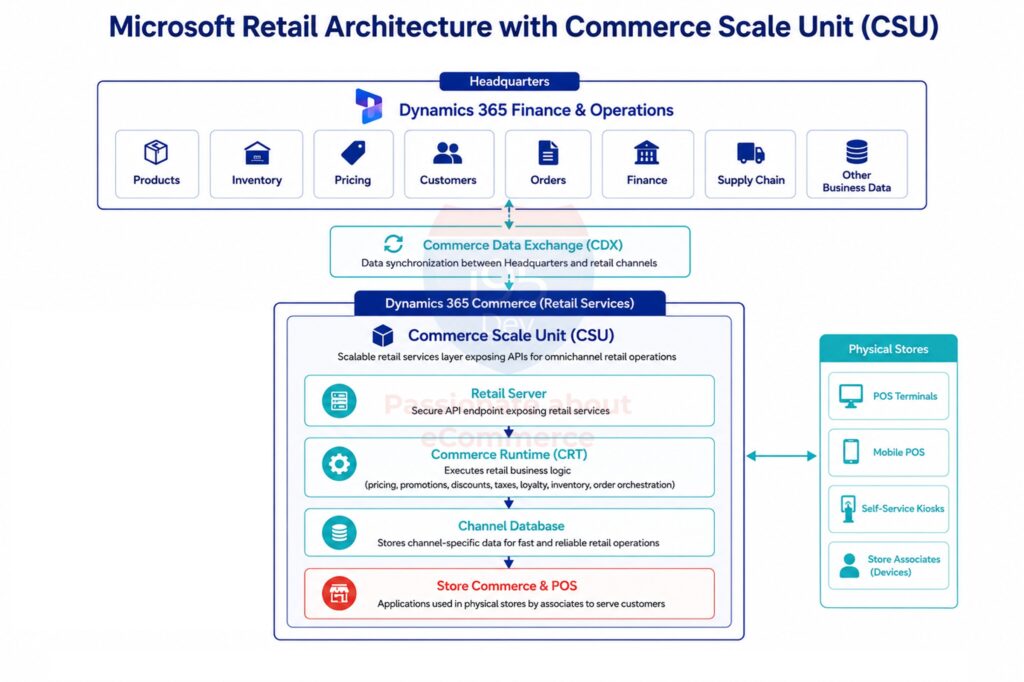
CSU sits alongside several other components that work together to deliver this:
| Component | Role |
|---|---|
| Headquarters (Finance & Operations) | System of record for products, pricing, inventory, customers, and financials |
| Commerce Scale Unit | Exposes retail APIs for omnichannel operations |
| Commerce Runtime (CRT) | Executes pricing, discount, promotion, tax, and loyalty logic |
| Retail Server | Secure API gateway to Commerce Runtime |
| Channel Database | Local, high-performance data store for retail transactions |
| Commerce Data Exchange (CDX) | Synchronizes data between Headquarters and retail channels |
| Store Commerce / POS | In-store applications for sales, returns, and exchanges |
The practical result: when a customer checks pricing or inventory through your storefront, and a store associate checks the same thing through POS, both requests run through the same Commerce Runtime and land on the same answer. That of consistency is difficult to achieve to any other way.
Read the full breakdown: What Is Commerce Scale Unit (CSU) and Why Do eCommerce Businesses Need It?
OData vs. Commerce Scale Unit: Which one do you actually need?
This is usually the first practical question once the concept clicks. The short answer: it’s not either/or. Mature integrations tend to use both, each assigned to a different job.
| Business Capability | OData | Commerce Scale Unit |
|---|---|---|
| Product, customer, and order synchronization | Well suited | Supported |
| Financial data exchange | Primary use case | Not the intended purpose |
| Store-level inventory availability | Limited | Purpose-built for this |
| Customer-specific / omnichannel pricing | Limited | Native retail pricing engine |
| Promotions and loyalty | Not designed for this | Native capability |
| BOPIS and POS interactions | Requires heavy customization | Purpose-built for this |
A simple way to decide: if the answer to a request could change from one minute to the next based on live activity, it belongs on CSU. If it’s a stored business record that changes infrequently, OData is the right tool. A third option, the Data Management Framework (DMF), handles large batch jobs like an initial catalog load or a scheduled bulk price update. It’s not a competitor to either, just the right tool for high-volume data movement.
Read the full comparison: OData vs Commerce Scale Unit (CSU): Choosing the Right Integration Approach
Where CSU creates real business value
Architecture discussions only matter if they translate into outcomes customers notice. Here are the scenarios where CSU consistently makes a measurable difference:
- Real-time inventory across stores – Fewer cancelled orders and higher conversion, because the storefront reflects what’s actually available, not what was true at last sync.
- Customer-specific pricing everywhere – One pricing engine instead of two, reducing disputes and manual corrections.
- Buy Online, Pick Up In Store (BOPIS) – Reliable pickup experiences that don’t fall apart between the last sync and checkout.
- A unified loyalty experience – Points and rewards that work identically online and in-store.
- Consistent promotions – One campaign configuration instead of two rule sets that can drift apart.
- True omnichannel order management – Buy online, return in store, ship from the nearest location, and everything in between.
- Store inventory visibility before a visit – Converting online research into confident in-store or pickup purchases.
These aren’t theoretical. The same article walks through two real, anonymized builds, a multi-banner retailer unifying loyalty across regulated product lines, and a beverage manufacturer-distributor hitting a ten-second inventory-latency target across web, call center, and store, where this architecture was implemented end to end.
Read the full scenarios with business impact detail: 7 Retail Scenarios Where Commerce Scale Unit (CSU) Makes All the Difference
The mistakes worth avoiding
A handful of recurring decisions cause most integration problems in this space. Teams use OData for retail logic it was never designed to handle. They rebuild Microsoft’s pricing or loyalty engine inside the storefront instead of borrowing it. They poll inventory aggressively rather than querying it properly, or they design the architecture only for today’s store count and paint themselves into a corner.
The most damaging mistake by far is assuming CSU requires replacing Dynamics 365 Finance & Operations or migrating away from Adobe Commerce or Shopify. It doesn’t. CSU is additive. It extends the architecture you already have.
Read the full list with fixes for each: 10 Common Mistakes When Integrating Adobe Commerce or Shopify with Dynamics 365 Finance & Operations
Building an architecture that grows with the business
Beyond the individual scenarios and mistakes, a few principles tend to separate integrations that scale from ones that need to be rebuilt every couple of years.
- Start with the business capability, not the technology: Figure out what customer experience or operational outcome you’re actually trying to deliver, and the choice between OData and CSU tends to follow from that on its own.
- Keep Finance & Operations as the single source of truth: CSU doesn’t change this. Products, customers, and financial records still live in one place, and pricing or inventory logic shouldn’t fork into a second version inside the eCommerce platform.
- Bring CSU in incrementally rather than all at once: You don’t need every retail capability on day one; most retailers start with real-time inventory or BOPIS and layer in pricing, loyalty, and promotions once the business is actually asking for them.
- Don’t duplicate business logic: Every pricing rule or loyalty calculation rebuilt inside the storefront is one more thing that can drift out of sync with Dynamics 365. Let Microsoft’s retail engine own that logic and expose it through CSU instead.
- Design for the store count you’ll have in three years, not the one you have today: Retailers who plan around current requirements alone tend to hit a costly redesign the moment a second or third location gets added, and planning ahead now keeps that door open even if you don’t build everything right away.
How i95Dev Helps Retailers Build This Architecture
Most eCommerce agencies tend to know Adobe Commerce or Shopify well but haven’t spent years inside Dynamics 365 Finance & Operations. ERP consultants are the opposite: deep on Dynamics 365, not equipped to build or extend a modern storefront. So retailers end up coordinating between the two, often with a separate managed services provider layered on top just to keep the wires connected.
i95Dev works across that entire lifecycle: building and supporting storefronts on Adobe Commerce, Shopify, and BigCommerce, integrating them with Dynamics 365 Finance & Operations and Commerce Scale Unit, and managing the architecture as the business grows. For mid-market manufacturers, wholesalers, and distributors running complex pricing, multi-location fulfillment, and POS operations on Dynamics 365, that combination matters more than it does for a simpler, single-channel business.
Our work in this space typically covers:
- Architecture assessment. We review your current integration and find where custom workarounds have accumulated, and where CSU would take the weight off.
- Omnichannel integration strategy, meaning we decide with you which capabilities belong in OData and which should move to Commerce Scale Unit, based on how your retail operations actually run.
- CSU implementation itself: building and supporting pricing, inventory, loyalty, promotions, and POS scenarios once the strategy is set.
- Long-term architecture support, so the integration scales as you add stores, fulfillment models, or new sales channels instead of forcing a redesign every time something changes.
If your current integration is starting to strain under real-time retail requirements, or you’re planning a store expansion and want the architecture right from the start, talk to i95Dev about your Dynamics 365 and Commerce Scale Unit integration.
Frequently Asked Questions
Conclusion
Integrating an eCommerce platform with Dynamics 365 Finance & Operations used to mean one thing: keeping product, customer, and order data in sync. As retailers expand into multiple stores, POS operations, and true omnichannel fulfillment, that definition has to expand too.
Commerce Scale Unit is how Microsoft’s retail architecture supports that expansion. It doesn’t replace what you’ve already built. It gives your storefront direct access to the same real-time pricing, inventory, loyalty, and promotion logic that already runs your physical stores.
The five articles in this guide go deeper into each part of that story. Read them in order, or jump to the one most relevant to where you are, whether that’s an existing integration starting to strain, or a new one you’re still designing.
Explore the full Commerce Scale Unit series
- Why Traditional eCommerce and Dynamics 365 Integrations Break Down in Omnichannel Retail – The problem, and why growth exposes it.
- What Is Commerce Scale Unit (CSU) and Why Do eCommerce Businesses Need It? – The architecture, explained component by component.
- OData vs Commerce Scale Unit (CSU): Choosing the Right Integration Approach – A practical decision framework.
- 7 Retail Scenarios Where Commerce Scale Unit (CSU) Makes All the Difference – Where the business value shows up.
- 10 Common Mistakes When Integrating Adobe Commerce or Shopify with Dynamics 365 Finance & Operations – What to avoid, and how to fix it if you’re already there.